Custom CRM development.
Most businesses should buy a CRM, not build one. But when your sales process has stages, parties or paperwork that no off-the-shelf CRM models well, the team ends up working around the tool. We build CRMs shaped to the process — and tell you plainly when a subscription would do.
Already have a CRM that works, and just need it connected to your other tools? That’s CRM and system integration, not a new CRM.
Signs a standard CRM isn’t fitting.
- The real pipeline lives in a spreadsheet next to the CRM, because the CRM’s stages don’t match how deals move.
- A deal involves several parties — buyer, partner, investor, agent — and the CRM only understands one contact per deal.
- Approvals, documents and payment milestones are tracked by email, outside the system that’s meant to hold them.
- You pay for many seats and modules, and the team uses a fraction of them.
- Nobody trusts the CRM’s numbers, so every report is rebuilt by hand.
What a custom CRM can include.
A pipeline with your stages
Stages, required fields and next steps that reflect how a deal really moves — not a generic lead → opportunity → won.
Inquiry intake with attribution
Website and form inquiries arrive as records with their source page and campaign, so you know which channel produced which customer.
Follow-up queues
A daily list of who needs a reply, a reminder or a next step, so warm leads don’t go cold in an inbox.
Documents and activity history
Proposals, contracts and notes attached to the record, with a timeline of what happened and who did it.
Portals for customers or partners
Secure access for investors, clients or partners to see their own records and documents — and nothing else.
Reporting you can rely on
Pipeline, conversion and revenue figures calculated from the same records the team works in, with test data kept out.
Buy, extend, or build?
The cheapest option that fits your process is the right one. This is how we decide.
Off-the-shelf CRM
When
A standard sales pipeline with a small team: one buyer per deal, ordinary stages, email and calls.
Our advice
Buy one. HubSpot, Pipedrive and similar products are excellent at this, and cheaper than building.
Off-the-shelf, extended
When
The CRM fits most of the process, but data has to flow in from your website, finance or operations tools.
Our advice
Keep it and integrate around it. We can build the connections and leave the CRM in charge.
Custom CRM
When
The process itself is the difference: multi-party deals, regulated steps, portals, or a workflow the products can’t model without constant workarounds.
Our advice
Worth building — kept small, owned by you, and extended only as the process proves it needs more.
Is this a fit?
A good fit when
- Your sales process is specific to your business and stable enough to describe.
- Several people rely on the system every day.
- You’ve tried an off-the-shelf CRM and the workarounds now cost more than they save.
- You want to own the data and the code rather than rent them.
Probably not a fit when
- A standard B2B pipeline that an entry-level CRM subscription already handles — we’ll tell you to buy it.
- The main problem is that your existing tools don’t share data — that’s an integration project.
- You need a full enterprise suite: marketing automation, call-centre telephony and territory management in one product.
Not sure which side you’re on? Describe the situation and we’ll tell you honestly — including when the answer is not to build anything.
Examples.
Each example is labelled. Production software built for Satori, where our founder is CTO and partner. Internal tools we built to run our own business. Internal experiments we’re still trialling. And illustrations of the kind of work, which are not client projects.
Internal Raul Ventures tool
Our own sales hub
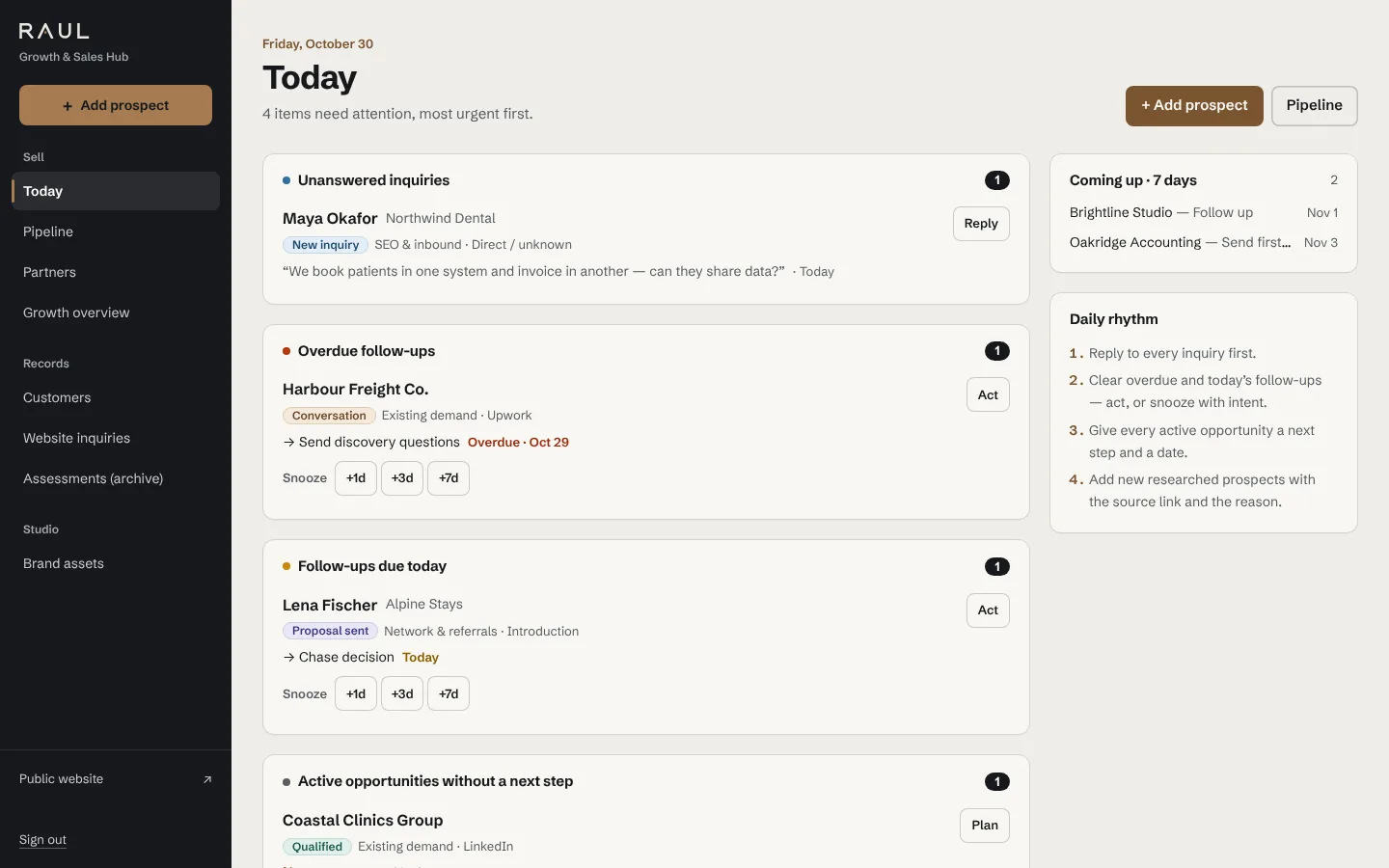
The CRM behind this website. Inquiries arrive from the contact form with their source page and campaign, land in the pipeline, trigger an email notification and are followed up from a daily queue. It also runs as an installable app on phone and tablet.
Built for Satori · in production
Investment platform and CRM for Satori
A purpose-built system for Satori’s investment side: leads, opportunities, investor profiles, the villa-sales pipeline and documents, with portal access for investors.
Illustrative
Agency project intake
A CRM where an inquiry becomes a scoped project with an estimate, approval and kickoff checklist, instead of a deal that ends at “won”.
Illustrative
Partner-referred sales
Deals that carry both the customer and the referring partner, with the partner’s commission stage tracked alongside the sale.
A CRM we use every day.
We run our own business on a CRM we designed and built. It’s small on purpose: the pipeline, follow-ups and attribution we actually need, with reporting that excludes test records so the numbers can be trusted. It’s an internal tool, shown here with sample data.
How a project runs.
Map the process
We walk through how a deal really moves today, including the spreadsheet and the email threads, and decide what the first version must do.
Decide buy or build
If an existing product fits, we say so. If not, you get a written scope with the stages, records and roles of the first version.
Build the core
Pipeline, records and follow-ups first, used by your team early, with data imported from what you have.
Extend from use
Portals, documents and reports are added as real use shows they’re needed — not all up front.
Questions
Isn’t a custom CRM more expensive than a subscription?
Up front, yes. Compare it over several years instead: per-seat subscription costs, the add-ons you need, and the time the team spends on workarounds. For a standard process, the subscription usually wins, and we’ll say so.
A custom CRM pays off when the process itself is what the products can’t model.
Can you move our data from spreadsheets or an existing CRM?
Yes. Importing existing records is part of the first version, so the team starts with their real data rather than an empty system.
Will it work on phones?
Yes. We build responsive web applications that can be installed on a phone or tablet home screen, without an app store.
Who owns the system?
You do: the code, the data and the hosting accounts. You aren’t locked in to us.
Can it connect to our email, website and accounting?
Yes. Most CRMs we build start with website intake and email notifications; finance and other tools are connected through their APIs. See CRM and system integrations.
Where does your sales process stop fitting your CRM?
Describe how a deal moves from first contact to payment, and where it leaves the system. We’ll tell you whether to buy, extend or build.
or write to info@raulsoftwareservices.com, or message us on WhatsApp